Looking for a Time Doctor alternative without screenshots? Minutezilla is an option for teams that want project time tracking, attendance and leave requests in a browser workspace, without screenshot capture, keystroke logging or GPS tracking.
This comparison is published by Minutezilla, one of the providers discussed. It is not an independent ranking or a legal certification. Time Doctor offers workforce analytics and configurable monitoring; switching is only useful if another tool better fits your requirements. Teams in Germany should review working-time procedures and data processing separately from product labels.
Time Doctor vs. Minutezilla: practical differences
| Requirement | Time Doctor | Minutezilla |
|---|---|---|
| Primary workflow | Time tracking and workforce analytics. | Project time, browser attendance and leave approvals. |
| Screenshots | Configurable; can be disabled or blurred. | No screenshot capture. |
| Privacy and hosting | Documents privacy controls and EU/UK data centres for EU/UK customers; confirm your terms. | Hosting in Finland within the EU; review processing terms and access rules. |
| Reporting and payroll | Payroll features and integrations; check the chosen plan. | PDF time reports, CSV HR reports and payroll CSV presets. Validate fields with your payroll contact. |
| Roles and language | Check supported permissions and languages for your deployment. | Admin, manager and member; English app interface and German-language email support. |
| Cost | See current plans and billing terms on the official pricing page. | All Pro features free until June 1, 2027 without a credit card; later pricing is planned. |
Time Doctor can be used with screenshots disabled. The difference is therefore not simply “monitoring versus privacy”: compare the data each workflow records, your configuration and the reports you need.
When Minutezilla may fit
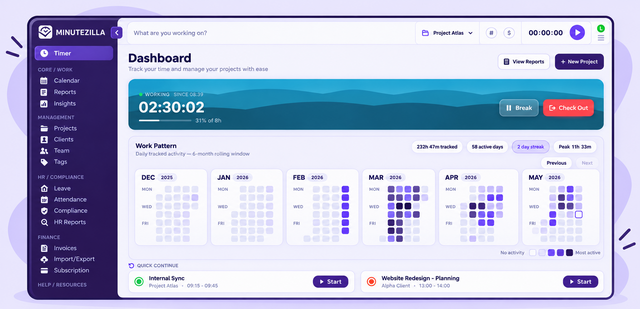
Consider Minutezilla if your priority is recording project work alongside attendance, leave requests and overtime in one web workspace. Entries can be assigned to clients, projects and tags. Members see their own leave balance; admins or managers approve requests and review HR reports.
An internet connection is required. This web workflow does not provide a native smartphone app, shift planning, custom roles, a public API or an automatic import from Time Doctor. Do not assume it replaces Time Doctor’s workforce analytics or integrations.
Try Minutezilla for free
Time tracking, attendance, breaks and leave in one tool. Right in the browser, no credit card.
A practical pilot for a remote team
Illustrative scenario, not a customer story: a twelve-person agency tests one normal working week. Employees record a client meeting, internal work and a manual correction, then log attendance and breaks separately. A manager reviews a leave request and exports a time report and an HR report.
The team checks whether project allocations and attendance records are understandable, whether permissions fit each role and whether payroll can use the exported fields. No migration success, time saving, employee-satisfaction improvement or audit outcome is claimed.
Switching from Time Doctor: a checklist
- List required devices, reports, approvals and monitoring settings. Confirm whether changing your existing Time Doctor configuration would address the problem.
- Export and retain historical Time Doctor records using its supported formats. Minutezilla does not automatically import these records.
- Create a Minutezilla workspace, add projects and clients, set up leave types and configure daily and weekly overtime thresholds.
- Invite a small pilot group and test a complete working day, a leave request, corrections and a monthly export.
- Agree a start date and review the process with employees and payroll before moving the wider team.
What teams in Germany should review
The Federal Labour Court’s decision 1 ABR 22/21 explains the obligation to introduce a working-time recording system under section 3(2), no. 1 of the Occupational Safety and Health Act. It does not prescribe a particular application.
Minutezilla records attendance and breaks, and can flag insufficient recorded breaks at check-out. It does not automatically ensure that breaks were taken or that every legal limit is satisfied. Define recording, review and correction procedures for your organisation.
EU hosting alone does not establish GDPR compliance. Review processing agreements, access, retention, employee information and any applicable representation requirements. Read our security information and privacy notice.
Time Doctor alternative: frequently asked questions
Can Time Doctor be used without screenshots?
Yes. Time Doctor documents screenshot settings that can disable or blur capture. Check what is enabled for your account and team.
Does Minutezilla take screenshots?
No. The Minutezilla web workflow does not capture screenshots, log keystrokes or track GPS locations. It records project time, attendance and leave information.
Does either product guarantee GDPR or working-time compliance?
No blanket guarantee applies to your implementation. Review processing terms, access, retention, employee information and working-time procedures.
Can I import Time Doctor records automatically?
No. Minutezilla does not currently provide automatic Time Doctor or CSV import. Retain historical records separately and agree when new records begin.
Is the Minutezilla app available in German?
The app interface is English. German-language support is available by email; the marketing website has German and English pages.
Can Minutezilla replace every Time Doctor feature?
No. Test the workflow you need. This web workflow does not provide Time Doctor’s workforce analytics, native smartphone apps, shift planning or public API integrations.
What does Minutezilla cost now?
All Pro features are free without a credit card until June 1, 2027. Later pricing is planned; check the current pricing page before choosing.
Sources and review method
Reviewed on October 13, 2026 using the primary sources below and the current Minutezilla web workflow. Competitor features depend on configuration and plan; check the provider’s current terms before choosing.
- Time Doctor FAQ: monitoring controls, data hosting and workforce analytics
- Time Doctor current pricing
- Time Doctor payroll features and integrations
- Federal Labour Court decision 1 ABR 22/21
Choose around your team’s workflow
Minutezilla may suit teams seeking browser-based time tracking without screenshots, plus attendance and leave approvals. Time Doctor may suit teams needing its workforce analytics and integrations. Run the same pilot tasks in both and compare usable results.
Start Minutezilla for free or review the launch offer and planned pricing. Related guides cover the Hubstaff alternative, choosing a Clockodo alternative and time tracking software for Germany.