Looking for a Hubstaff alternative in Germany? Minutezilla is worth testing if your team needs project time tracking, browser-based attendance and leave requests in one workspace. Hubstaff is also a capable time tracking platform, with optional monitoring and workforce features. The right choice depends on the records, devices and exports your team actually needs.
This comparison is published by Minutezilla, the provider of one of the products discussed. It is a practical selection guide, not an independent ranking or a guarantee of legal compliance. Competitor information was checked against the official sources linked below on 13 October 2026.
Hubstaff vs Minutezilla: a practical comparison
| Requirement | Hubstaff | Minutezilla |
|---|---|---|
| Project time tracking | Time tracking and timesheets; check the supported app and chosen plan. | Browser timer and manual entries assigned to projects, clients and tags. |
| Monitoring choices | Screenshots, app/URL tracking and activity rates are configurable. Hubstaff states that it does not log keystrokes. | No screenshot capture, keystroke logging or GPS tracking. |
| Attendance and breaks | Attendance, work-break and time-off reports are documented; confirm the plan and workflow. | Browser check-in, breaks and check-out, with issues flagged for review. |
| Leave and overtime | Check time-off policies and overtime reporting against your selected plan. | Leave balances and approval requests; overtime calculated against configured daily and weekly thresholds. |
| Reporting | Several report types, including attendance and breaks; test your required export. | PDF time reports and CSV HR reports. Validate payroll CSV presets with your accountant before relying on them. |
| Devices | Desktop and mobile apps, plus web-based tracking options. | Web app on desktop and mobile browsers. An internet connection is required. |
| Current cost | Check Hubstaff’s current pricing, add-ons and billing terms. | All Pro features free until 1 June 2027, without a credit card. Later pricing is planned; see the pricing page. |
Hubstaff’s monitoring options can be disabled or adjusted. Choosing Minutezilla does not mean Hubstaff is inherently unlawful or unsuitable for Germany. Compare both products with the same tasks and settings.
When Minutezilla may fit your team
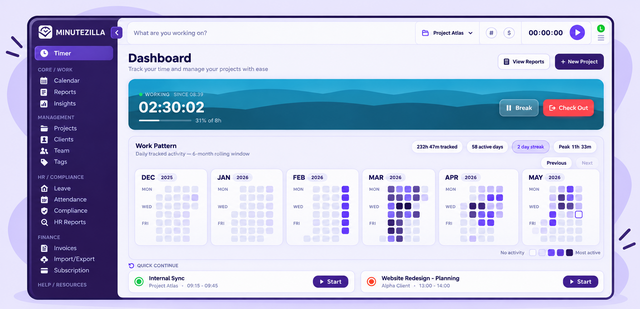
Consider Minutezilla when your priority is recording project hours alongside attendance, leave and overtime, without configuring screenshot or location monitoring. Team members can continue recent entries, view their daily goal and request time off. Admins and managers review requests and HR reports using the three roles: admin, manager and member.
If your workflow depends on native mobile apps, GPS/geofencing, shift planning, a public API or automatic migration from another tool, check those requirements first: they are not offered by this Minutezilla web workflow. The app interface is English; German-language email support is available.
Try Minutezilla for free
Time tracking, attendance, breaks and leave in one tool. Right in the browser, no credit card.
What teams in Germany should check
Software supports record keeping, but the employer still needs suitable procedures. The Federal Labour Court’s decision 1 ABR 22/21 explains the obligation to introduce a system for recording working time. A product label does not establish that your specific implementation meets every obligation.
Under section 4 of the Working Time Act, work exceeding six hours generally requires at least 30 minutes of breaks, and work exceeding nine hours at least 45 minutes. Exactly six hours is not the same threshold as more than six hours. Check applicable exceptions and your working arrangements. Minutezilla can flag insufficient recorded breaks at check-out; a flag does not itself ensure that a break was actually taken.
Review access rights, employee information, retention, a data processing agreement and any applicable employee-representation requirements before rollout. Minutezilla hosts in Finland, within the EU. EU hosting is one consideration; it is not proof that every use of the service complies with GDPR. See our security information and privacy notice.
Example: a small project team testing the workflow
Illustrative scenario, not a customer case study: a 12-person agency tests one normal working week. Employees clock in, record breaks and allocate project time to client work. A manager reviews one leave request and a missed check-out, then exports attendance and project reports.
The team checks whether project totals and attendance tell the expected story, whether members see only appropriate records, and whether the accountant can use the export. Project time and attendance are different records: do not assume one replaces the other or that exported data automatically integrates with payroll.
Switching from Hubstaff: test before rollout
- List the reports, devices, approvals and monitoring settings you need. Keep a sample of your current reports for comparison.
- Create a Minutezilla account, set up a workspace and configure projects, leave types, roles and overtime thresholds.
- Invite a small pilot group and test check-in, break recording, manual entries, leave approval and report exports.
- Export and retain historical Hubstaff records according to your policy. Minutezilla does not currently provide an automatic Hubstaff or CSV import; agree a clear date for starting new records.
- Review the pilot with staff and your payroll contact before moving the wider team.
Hubstaff alternative in Germany: frequently asked questions
Is Minutezilla a Hubstaff alternative for teams in Germany?
It is an option for teams that need project time tracking, browser attendance, leave approvals and reports together. Test your required workflows first. It does not replace every Hubstaff capability.
Does Hubstaff always capture screenshots?
No. Hubstaff describes screenshots and other monitoring features as configurable. What is collected depends on the app and your organisation’s settings. Hubstaff also states that it does not log keystrokes.
Does Minutezilla capture screenshots or GPS locations?
The Minutezilla web workflow does not capture screenshots, log keystrokes or track GPS locations. It records time entries, attendance and leave information needed for those workflows.
Does using Minutezilla guarantee GDPR or working-time compliance?
No. EU hosting and recording features do not replace an appropriate data processing agreement, access rules, employee information and working-time procedures. Review your specific implementation.
Is Minutezilla free, and can I import Hubstaff records?
All Pro features are free until 1 June 2027 without a credit card; later pricing is planned. There is no automatic Hubstaff or CSV import. Retain historical records separately and choose a clear switchover date.
Can I use Minutezilla reports for payroll?
HR reports can be exported as CSV and time reports as PDF. Payroll CSV presets need to be checked against your payroll provider’s required fields; an export is not an automatic integration.
Sources and comparison method
Reviewed on 13 October 2026. Hubstaff facts come from its own documentation; availability can depend on the app, settings, plan and add-ons. Minutezilla descriptions cover the current web workflow and launch offer. No independent benchmark, customer testimonial or legal certification is implied.
- Hubstaff: how tracking works and configurable monitoring
- Hubstaff: report types, including attendance, work breaks and time off
- Hubstaff: current pricing
- Federal Labour Court: decision 1 ABR 22/21
- German Working Time Act: section 4, breaks
Choose a Hubstaff alternative around your workflow
Minutezilla may suit teams that want browser-based project time tracking, attendance and leave approvals together. Hubstaff may suit teams that need its broader device and configurable workforce capabilities. Run the same pilot tasks in both products and compare the results, not just feature labels.
Start Minutezilla for free or review the launch offer and planned pricing. For more detail, read about time tracking software for Germany, HR reports and the Clockify comparison.